Horizon features
Dive into our features and explore how Horizon works.

Outputs
With Horizon, you can create the catalog formats you need, from a digital catalog that fits any screen to a PDF.

Digital leaflet
Shows the first page as a single page, and then combines all other pages into spreads for a classic catalog feel, but with a vertical scroll.
Easy to embed on your website and integrate with your ecommerce.
Once you have embedded on your website, you can schedule the next leaflet to go live automatically.

Single page view
Click one checkbox, and then your leaflet is shown one page at a time instead of side-by-side. Shows fewer products, but gives each more space.

Preview
Before going live, you can send to colleagues for iterations, and check for any errors, by seeing the output in a preview.

Mobile optimized
Since the output is based on web components, your leaflet will automatically scale based on the device's dimensions, whether it's desktop, tablet or mobile.

Digital PDF
Exports the leaflet as a PDF to use online, for example on marketplaces, as a Flipbook or whatever else you want to use a PDF for.

Data sources
Horizon builds your catalogs from your own data: you select the offers, and your product feed supplies the info and keeps it current.

Product Feed
The product feed that powers your ecommerce already has all products and their information, such as images, price, description etc.
Horizon connects directly to your product feed to pull the correct images and information directly into your leaflet.
Continuous feed updates are synced to Horizon and your leaflets, so you show the latest price and information.
We use Google's standard merchant feed as our basis, but can work with more custom product feeds as well.

Briefing file
Your product feed contains thousands of products. With a briefing file, you can tell Horizon specifically which products from the feed should be used to create the leaflet.

Automation
Horizon places your offers in layouts automatically, applying your templates, themes and brand elements to every page.

Custom automation
We'll make a custom automation for your company and brand.
The automation will match sections and number of products to the right layouts, colors and visual design to create your leaflet.

Brand elements
Design elements (price boxes, splashes, etc.) that match your brand. Will be created and configured by iPaper

Custom offer design
For example how large the CTA are, if there should be a product description, whether a splash should be present, etc. Will be created and configured by iPaper

Rules
Finally, when running the automation, rules will apply your brand elements and custom offer designs. Will be created and configured by iPaper.

Themes
A theme is a collection of design settings that controls the visual branding of a page. It contains settings such as:
- Background colors
- CTA and text colors
- Borders and styling
It's set up once and can then be reused again and again.

Templates
Page Templates defines the layout of a page.
How many areas a page are divided into, how large are they, and how are they placed in relation to each other?
That's all controlled by templates.
Offer elements
Product offers are built up from different elements that are designed to fit your brand and style. Horizon automatically creates them when creating a catalog and keeps the info in them up-to-date.

Editing
You can fine-tune any page once it’s built, from final tweaks and last-minute changes to adding videos, GIFs and inspirational images.

Add offers and products
Need to add new offers to your leaflet? Add them manually from your feed in a few clicks.

Add a new page
Adds a new page to an existing leaflet. A Template must be chosen for the new page when adding.

Scenes
A scene issenvironmental image where you have full control of the placement of the components of a regular packshot, such as price box, description, etc.

Videos
Add a dynamic, inspirational element to the leaflet. Supports MP4s and YouTube links.

GIFs
Add looping, simple animations to your leaflet with a few clicks.

Images
Add inspirational images or backgrounds. You can also add a link to the image if it contains a CTA.

Merge offers
No need to create product compositions outside of Horizon.
Simply merge two or more offers into one with a few clicks, and then you have a composition of the product images.
You can choose between multiple different types of compositions.

Drag-and-drop
Move offers, videos or images around with ease. You can also resize.


Apply theme
Themes are automatically applied to your leaflet, but you can always go in and manually change a page, or the entire leaflet, to another theme.
With a few clicks, your page has a whole new look and feel.

Conversion
Horizon connects your catalog to your webshop, with links to product pages or a direct webshop basket integration.

Webshop integration
Integrate your leaflet directly with your ecommerce, so CTA clicks either...
- open up a product modal of the product pagel, or
- adds the product directly to your basket.
See more our technical documentation.

External Links
When a CTA is clicked, it takes the viewer straight to the product page.

Statistics
You can follow how your catalogs perform, with views, clicks and completion rates in the Horizon dashboard or your own analytics.

Dashboard
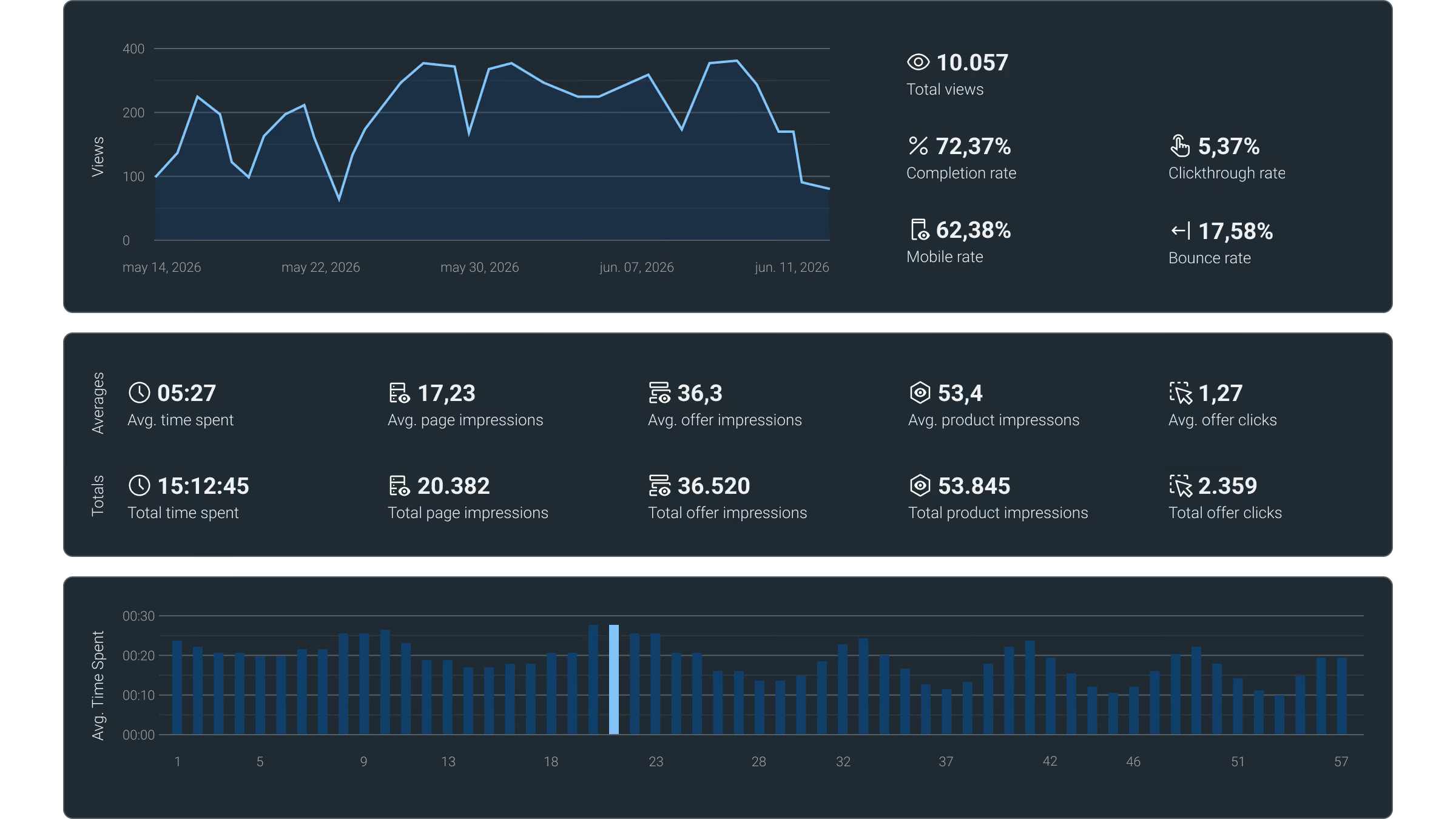
A built-in dashboard with the overview of all the most important metrics for your leaflets' performance.
It has everything from views and time spent to clicks, completion rate and much more.

Views
Views are an important metric, as it tells you how much overall traffic your leaflet is getting. A view is counted every time someone loads your leaflet

Time spent
Time spent measures how long viewers actively engage with the leaflet. It’s a good measure of how valuable and engaging your viewers find the leaflet.

Bounce rate
Bounce rate is important to determine how many viewers are abandoning the leaflet. Shown as a percentage of all views.

Clickthrough rate
Clickthrough rate is the number of views that had one or more offer clicks, expressed as a percentage of the total number of views.
Clickthrough rate is a good indicator of whether your leaflet is ‘just’ viewed, or the viewers take action.

Offer clicks
An offer click is tracked whenever someone clicks anywhere inside an offer area. Shown as both the total number and an average per view.

Impressions
Impressions are tracked when at least 30% of the content is visible and has been on the screen for more than 700 milliseconds.

Mobile rate
Mobile rate shows a percentage of how much of your traffic comes from mobile devices.

Completion rate
The average percentage of pages seen out of the total number of pages in your leaflet.

Time spent on pages
The average time viewers spend looking at a specific page as a bar chart.

Google Analytics
As your leaflet is embedded on your website, you can set up Google Analytics tracking as you would on any other page.

Other platforms
You can set up tracking for other platforms (Matomo, Adobe Analytics, etc.). You can also track custom events in your leaflet using our API.
Want to create leaflets with Horizon?
Try iPaper Horizon free for 14 days. Send us your product data, and one of our specialists will set up your trial with your own products.