3 ways to use digital catalogs in your ecommerce


Ecommerce have categories, search bars, filters and product pages designed to get shoppers from intent to purchase as efficiently as possible.
But 83% of visitors don’t have clear buying intent. They’re still exploring, ‘just looking’.
They want to see what's on offer and get inspired.
That’s where digital catalogs can play a crucial role in ecommerce: as a curated place to explore products before heading into filters and product pages.
And the results are… well, they speak for themselves.
Results of digital catalogs for ecommerce
Danish DIY retailer 10-4 analyzed more than six million webshop sessions in 2025. Sessions that included a visit to one of its digital catalogs had:
- 72.5% more time spent on their ecommerce
- 87% more pages viewed
- 5.1% higher average basket value
Across the Atlantic, Coppel, the 2nd largest Mexican retail group, increased sales attributed to catalog-like ‘campaigns pages’ by 300% and reduced bounce rate by 40%.
“Unlike a static catalog or a landing page based only on filters, ‘campaign pages’ via Horizon gives us the ability to tell a commercial story, prioritize the offer and make it more attractive, explorable and actionable.” - Carmen Nuñez Verdugo, Editorial and Commercial Strategy Manager, Coppel
So, you really should use digital catalogs actively in your marketing.
"But we don't make catalogs!"
You don't have to.
A digital catalog can now start with the same thing your filter and category pages do: your product feed.
Product names, prices, images and other information can come directly from your ecommerce data. Templates and rules determine how those products are presented, and automation handles much of the repetitive production work.
In other words, creating a digital catalog campaign doesn't have to be more complicated than creating another filter page.
And, when you have created your digital catalog, here are a few ways to use it in your marketing:
1. Put the digital catalog front-and-center on your ecommerce
Digital catalogs cater to those 83% who don’t know exactly what they want. Therefore, your digital catalog should have a central place in your ecommerce.
Promote it from your homepage, navigation, campaign banners, pop-ups etc.
Example
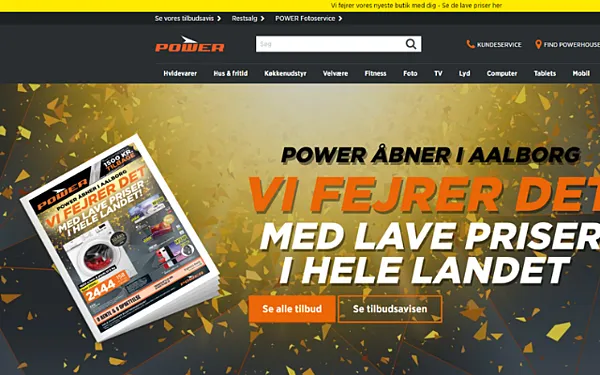
Danish electronics retailer Power promotes its catalog in the header of its homepage. It stands out and instantly appeals to those shoppers who just want to browse.
2. Use digital catalogs in your email campaigns
Promotional emails have limited space. You can feature a handful of products, but eventually you need somewhere to send people.
Often, that destination is a generic “Shop all offers” or product category page.
A digital catalog gives you another option.
Use the email to introduce the campaign or theme, highlight a few products and then invite shoppers to explore the complete selection in your catalog.
Example
JYSK UK highlights its range of catalogs in its welcome email. Subscribers can then instantly explore the wide range of products JYSK offers at their own speed. It's a logical next step in the shopper journey and an effective tactic to keep shoppers engaged.
3. Use digital catalogs as the destination for paid campaigns
Imagine running paid ads for a "Get your garden ready for summer" campaign.
Where should an ad click lead?
A product page is too specific. A category page containing hundreds of garden products can be too broad.
A digital catalog sits between the two.
So, your digital catalogs should be the destination for many of your paid top-funnel campaigns.
Example
Home store Søstrene Grene regularly uses catalogs in its social media. The recognizable catalog format attracts both new and regular customers and alerts them that new deals and discounts are available.

Give shoppers somewhere to browse with digital catalogs
Search, categories, filters and product pages aren't going anywhere. And they shouldn’t: They're extremely effective when a buyer knows what they want.
The opportunity is to add something for the majority who don't.
Digital catalogs can provide a layer for exploration: a place where shoppers can discover products, understand what's relevant and develop the intent that, eventually, takes them to category and product pages.
And because they can now be created from the product data you already have, digital catalogs can be created by any ecommerce with a product feed.
Continue Reading
The digital catalog software landscape in 2026

The Issuu alternative that's serious about selling

The Flipsnack alternative for retail marketing teams
Your catalogs will be in good hands
- We have over 20 years experience working with digital catalogs
- Our dedicated team of experts are on hand to guide you to success